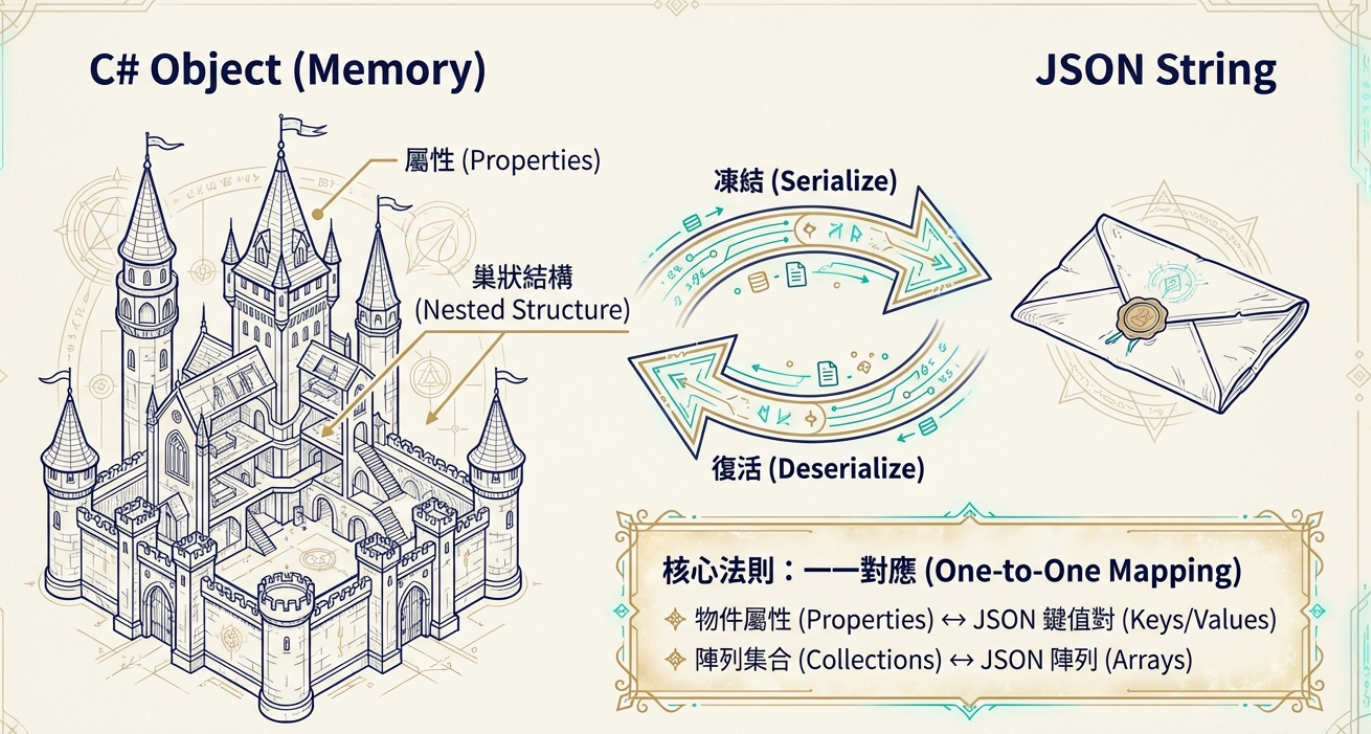
在數位世界中,序列化(Serialization) 和 反序列化(Deserialization) 就像是一對魔法師,負責在不同的資料形式之間進行轉換。想像一下,您有一個複雜的 C# 物件,裡面包含各種屬性、巢狀結構,甚至是陣列——這些資料存在於程式的記憶體中,就像是一座精美的城堡,但這座城堡只有您的程式看得懂
當您需要將這些資料傳送給其他系統,或是儲存到檔案中時,就需要將它們「打包」成一種通用的格式。這就是序列化的魔法:
1 2 3 4 5 6 7 8 9 10 11 var player = new Player { Name = "勇者艾倫" , Level = 99 , Equipment = new List<string > { "神劍" , "龍鱗甲" , "魔法戒指" } }; string json = JsonSerializer.Serialize(player);
序列化的核心概念是 狀態保存與還原 :
狀態保存 :將物件的所有屬性值、結構關係完整地「凍結」在文字格式中狀態還原 :從文字格式中「復活」出一模一樣的物件結構 序列化和反序列化的基礎是 一一對應的映射關係 :
物件屬性 ↔ JSON 鍵值對 陣列集合 ↔ JSON 陣列 巢狀物件 ↔ JSON 物件嵌套
這種對應關係確保了資料在轉換過程中不會遺失,就像是一把精確的鑰匙,能夠完美地開啟和鎖定資料的每一個角落。
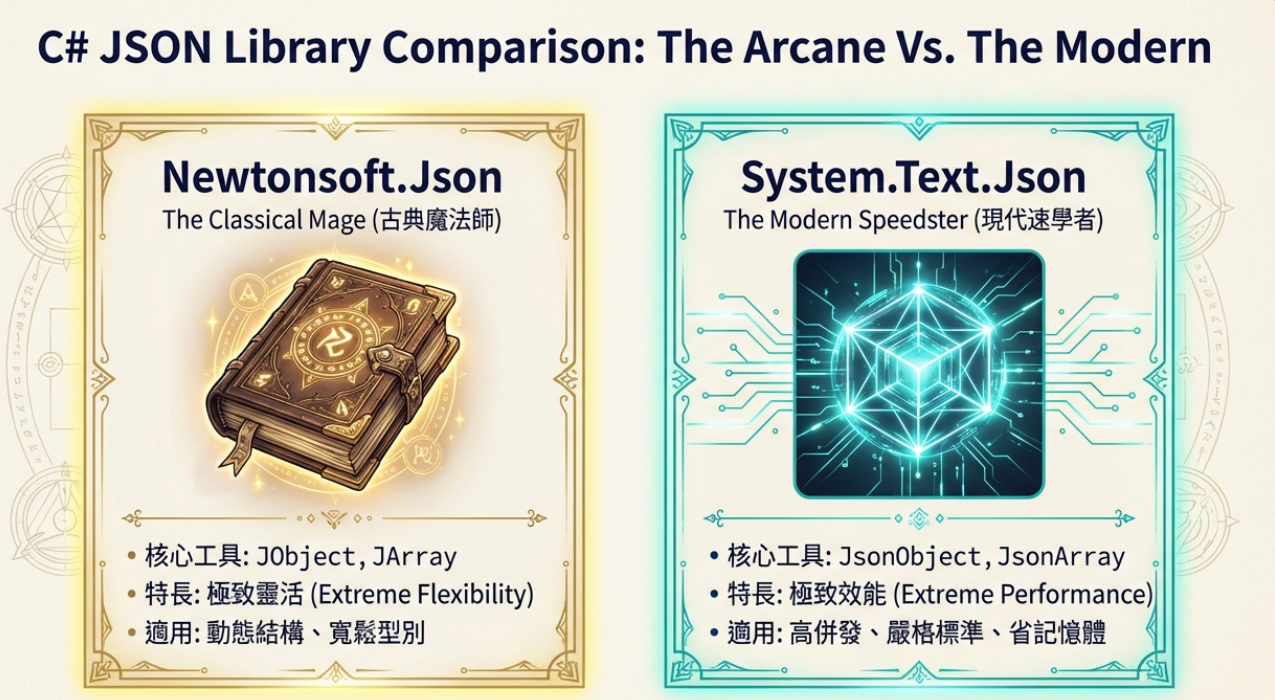
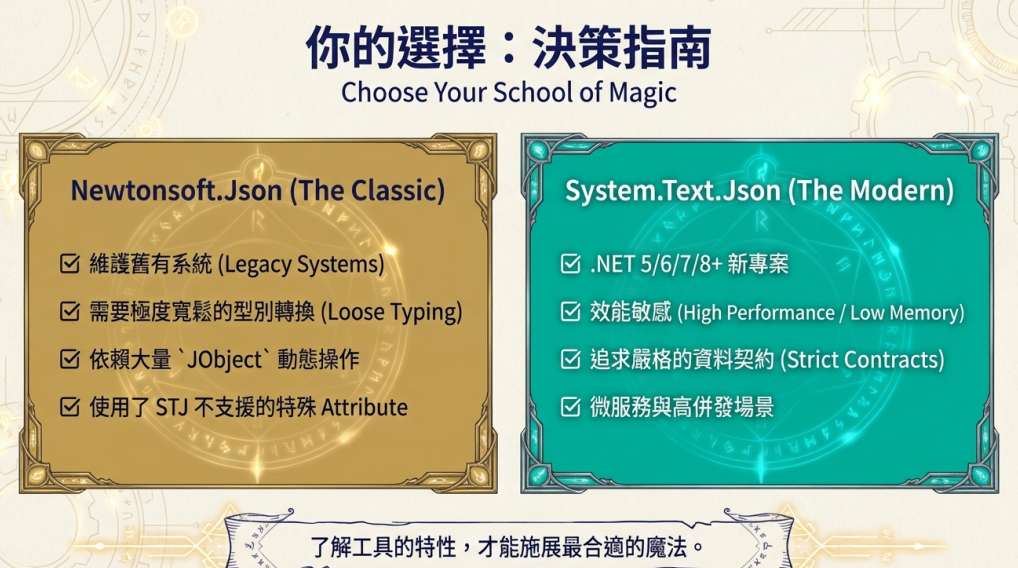
在 .NET 世界中,有兩大主要的 JSON 操作流派,各自擁有獨特的魔法工具:
📜 Newtonsoft.Json 的古典魔法
JObject :操作 JSON 物件的經典工具JArray :處理 JSON 陣列的傳統方式靈活性高 :動態操作、豐富的 API
⚡ System.Text.Json 的現代魔法
JsonObject :現代化的物件操作工具JsonArray :高效能的陣列處理效能優化 :更快的序列化速度、更少的記憶體使用
為什麼會使用這類東西?
欄位要不要加是執行期才知道
1 2 3 4 5 6 var body = new JObject();body["merchant_id" ] = merchantId; if (hasDiscount) body["discount_code" ] = code;
迴圈動態加欄位1 2 3 4 var body = new JObject();foreach (var kv in userSelectedFilters) body[kv.Key] = kv.Value;
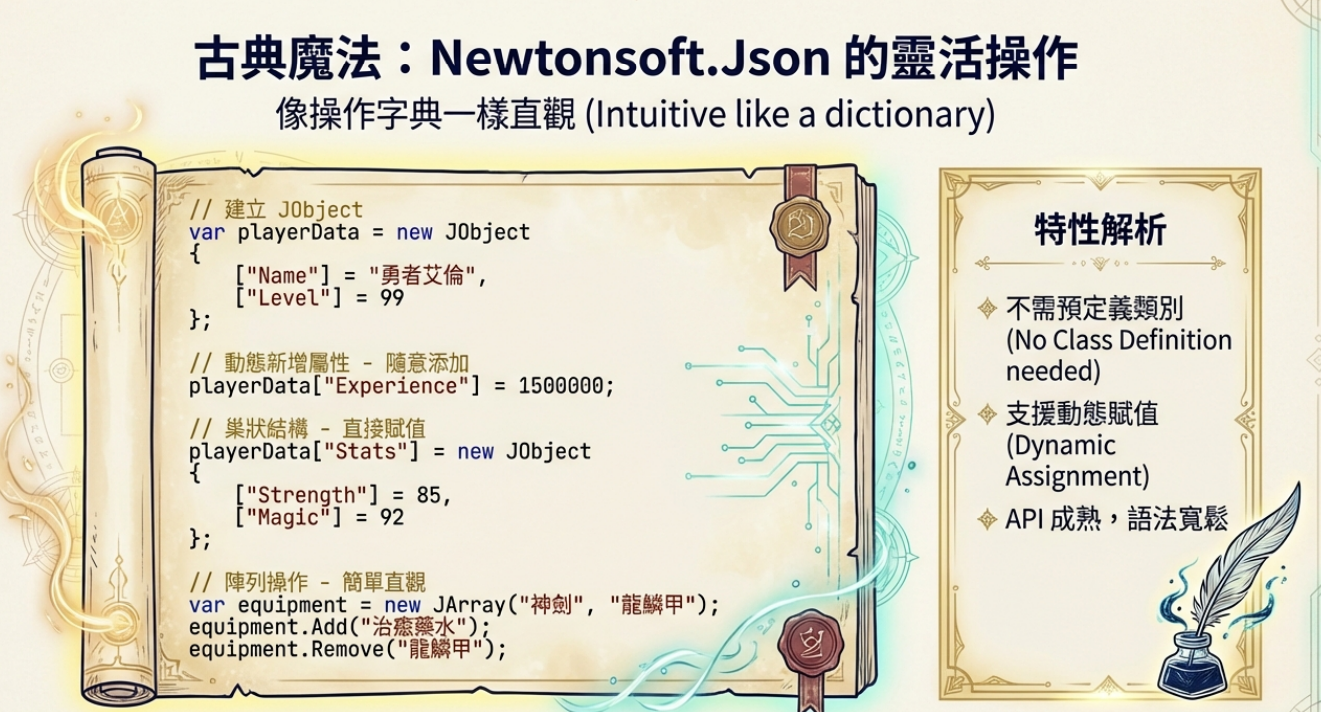
串接第三方 API,但你不知道回傳結構 在 Newtonsoft.Json 的世界中,JObject 和 JArray 是兩位經驗豐富的魔法師,它們提供了極為靈活的 JSON 操作能力:
🏛️ JObject:物件操作大師 1 2 3 4 5 6 7 8 9 10 11 12 13 14 15 16 17 18 19 20 21 22 23 var playerData = new JObject{ ["Name" ] = "勇者艾倫" , ["Level" ] = 99 , ["IsActive" ] = true }; playerData["Experience" ] = 1500000 ; playerData["LastLogin" ] = DateTime.Now; playerData["Stats" ] = new JObject { ["Strength" ] = 85 , ["Magic" ] = 92 , ["Defense" ] = 78 }; string name = (string )playerData["Name" ];int level = (int )playerData["Level" ];
📚 JArray:陣列操作專家 1 2 3 4 5 6 7 8 9 10 11 12 13 14 15 16 17 18 var equipment = new JArray("神劍" , "龍鱗甲" , "魔法戒指" );equipment.Add("治癒藥水" ); equipment.Insert(0 , "傳說盾牌" ); equipment.Remove("魔法戒指" ); playerData["Equipment" ] = equipment; foreach (var item in equipment){ Console.WriteLine($"裝備:{item} " ); }
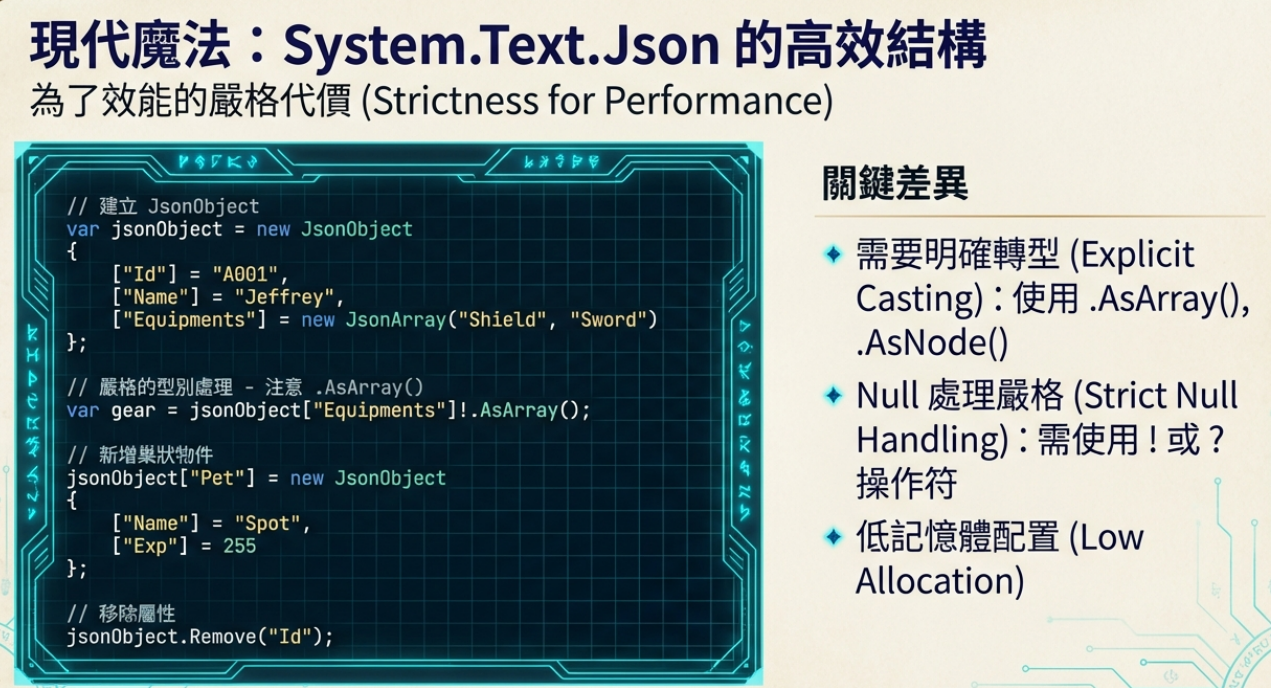
現代的 System.Text.Json 提供了更高效能的操作方式:
🔮 JsonObject:現代物件操作 1 2 3 4 5 6 7 8 9 10 11 12 13 14 15 16 17 18 19 20 21 var jsonObject = new JsonObject(){ ["Id" ] = "A001" , ["Name" ] = "Jeffrey" , ["Extra" ] = "Prop To Remove" , ["Equipments" ] = new JsonArray("Shield" , "Sword" , "Bottle" ) }; jsonObject["Score" ] = 32767 ; jsonObject["Pet" ] = new JsonObject() { ["Name" ] = "Spot" , ["Exp" ] = 255 }; jsonObject.Remove("Extra" );
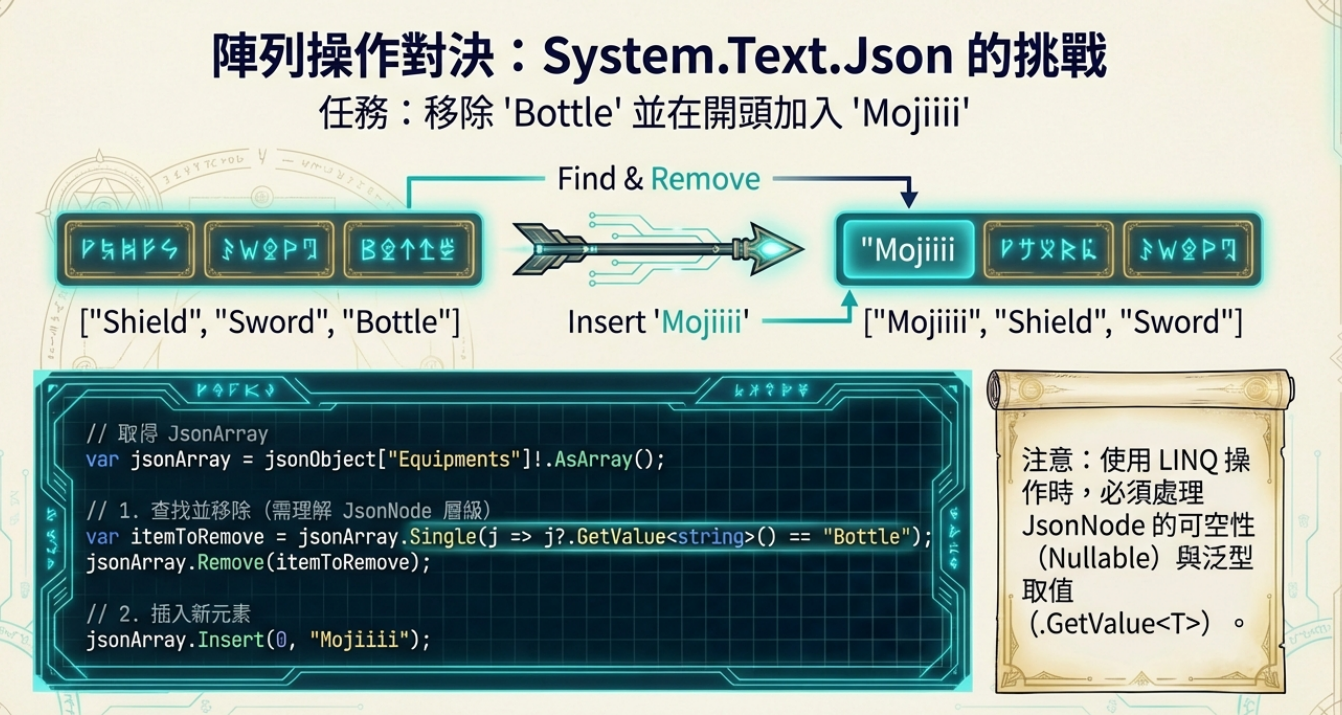
🌟 JsonArray:高效陣列處理 1 2 3 4 5 6 7 8 9 10 11 var jsonArray = jsonObject["Equipments" ]!.AsArray();jsonArray.Remove(jsonArray.Single(j => j?.GetValue<string >() == "Bottle" )); jsonArray.Insert(0 , "Mojiiii" ); var jsonString = jsonObject.ToJsonString(new JsonSerializerOptions{ WriteIndented = true });
1 2 3 4 5 6 7 8 9 10 11 12 13 14 15 16 17 18 19 20 21 22 23 24 25 26 27 28 29 30 31 32 33 34 35 36 37 38 39 40 41 42 43 44 45 46 47 48 49 50 51 52 var payTypeExpressInfo = JsonConvert.DeserializeObject<PayTypeExpressCreditCardEntity<PayTypeExpressInfoForStripeEntity>>(data.PayTypeExpressInfo);public class PayTypeExpressCreditCardEntity <T >{ public string Issuer { get ; set ; } public string Association { get ; set ; } public string No { get ; set ; } public string Month { get ; set ; } public string Year { get ; set ; } public T ExtendInfo { get ; set ; } } public class StripeCreditCardInfoEntity { [JsonProperty("country" ) ] public string CountryAliasCode { get ; set ; } [JsonProperty("brand" ) ] public string Brand { get ; set ; } }
1 var entity = JsonSerializer.Deserialize<AuditRewardLoyaltyPointsPromotionRuleRecordJobTaskData>(taskData);
以JsonObject操作物件 1 2 3 4 5 6 7 8 9 10 11 12 13 14 15 16 17 18 19 20 21 22 23 24 25 26 27 28 29 30 31 32 33 34 35 36 37 38 39 40 41 42 43 44 45 46 47 48 49 50 51 52 53 54 55 56 57 58 59 60 61 62 63 64 65 66 67 68 69 70 71 72 73 74 75 76 77 78 79 80 81 var jsonObject = new JsonObject(){ ["Id" ] = "A001" , ["Name" ] = "Jeffrey" , ["Extra" ] = "Prop To Remove" , ["Equipments" ] = new JsonArray("Shield" , "Sword" , "Bottle" ) }; jsonObject["Score" ] = 32767 ; jsonObject["Pet" ] = new JsonObject() { ["Name" ] = "Spot" , ["Exp" ] = 255 }; jsonObject.Remove("Extra" ); var jsonArray = jsonObject["Equipments" ]!.AsArray();jsonArray.Remove(jsonArray.Single(j => j?.GetValue<string >() == "Bottle" )); jsonArray.Insert(0 ,"Mojiiii" ); var jsonString = jsonObject.ToJsonString(new JsonSerializerOptions{ WriteIndented = true }); var restored = JsonNode.Parse(jsonString)!.AsObject();foreach (var prop in restored){ var pn = prop.Key; if (prop.Value is JsonObject) $"{pn} is JsonObject" .Dump(); else if (prop.Value is JsonArray) $"{pn} is JsonArray, length={prop.Value.AsArray().Count()} , 內容 {prop.Value} " .Dump(); else if (prop.Value?.AsValue().TryGetValue<int >(out int i) ?? false ) $"{pn} is Int, VALUE={i} " .Dump(); } var avatar = System.Text.Json.JsonSerializer.Deserialize<Avatar>(jsonString);if (avatar != null ){ Console.WriteLine($"Id: {avatar.Id} , Name: {avatar.Name} , Score: {avatar.Score} " ); if (avatar.Pet != null ) { Console.WriteLine($"Pet Name: {avatar.Pet.Name} , Exp: {avatar.Pet.Exp} " ); } if (avatar.Equipments != null ) { Console.WriteLine("Equipments: " + string .Join(", " , avatar.Equipments)); } } public class Avatar { public string Id { get ; set ; } public string Name { get ; set ; } public int Score { get ; set ; } public List<string > Equipments { get ; set ; } public Pet Pet { get ; set ; } } public class Pet { public string Name { get ; set ; } public int Exp { get ; set ; } }
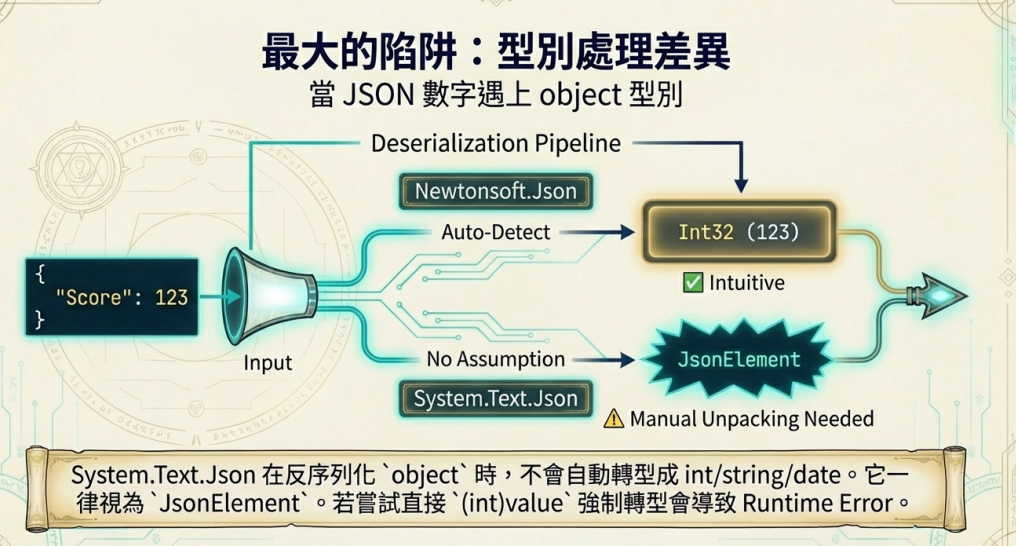
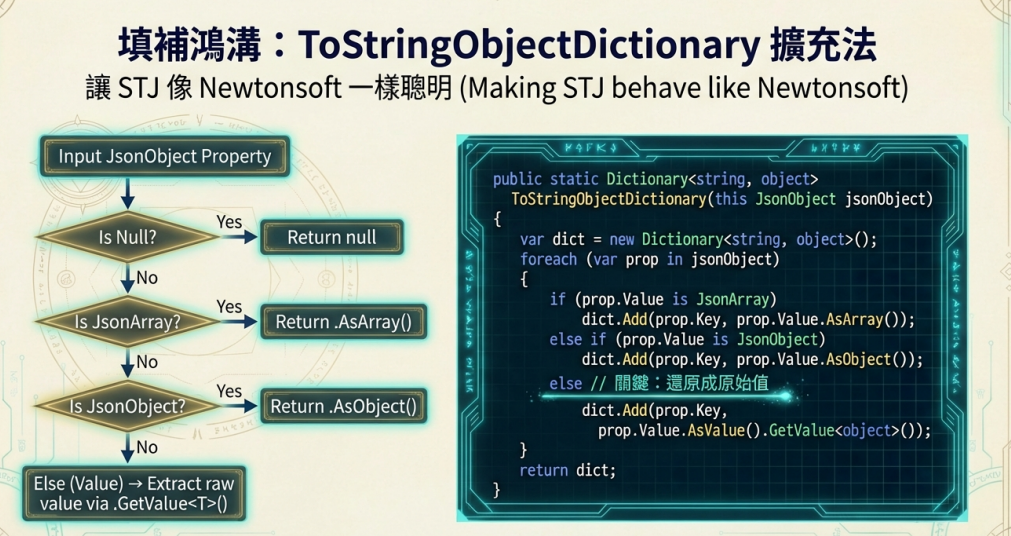
1 2 3 4 5 6 7 8 9 10 11 12 13 14 15 16 17 18 19 20 21 22 23 24 25 26 27 28 29 30 31 32 33 34 35 36 37 38 39 40 41 42 43 44 45 46 47 48 49 50 51 52 53 54 55 56 57 58 59 60 61 62 63 64 65 66 67 68 69 70 71 72 73 void Main (){ var jsonOpt = new JsonSerializerOptions() { WriteIndented = true }; var dict = new Dictionary<string ,object >() { ["iii" ] = 255 , ["sss" ] = "StringTest" , ["ddd" ] = DateTime.Today, ["aaa" ] = new int [] { 1 , 2 , 3 }, ["ooo" ] = new { Prop = 123 }, ["g" ] = Guid.NewGuid(), ["n" ] = null ! }; var json = JsonSerializer.Serialize(dict, jsonOpt); "=====NewtonSoft=====" .Dump(); var newTonObject = Newtonsoft.Json.JsonConvert.DeserializeObject<Dictionary<string ,object >>(json); foreach (var kvp in newTonObject) { $"Result Value : {kvp.Value?.GetType().Name} , KVP : {kvp.Key} = {kvp.Value} " .Dump(); } "=====TextJson=====" .Dump(); var textJsonObject = JsonSerializer.Deserialize<Dictionary<string , object >>(json); foreach (var kvp in textJsonObject!) { $"Result Value : {kvp.Value?.GetType().Name} , KVP : {kvp.Key} = {kvp.Value} " .Dump(); } "=====TextJson With Extension=====" .Dump(); var dSysTextJson = JsonSerializer.Deserialize<JsonObject>(json)!.ToStringObjectDictionary(); foreach (var kv in dSysTextJson!) { Console.WriteLine($"{kv.Value?.GetType().Name} {kv.Key} = {kv.Value ?? "null" } " ); } } public static class JsonDictStringObjExtensions { public static Dictionary<string , object > ToStringObjectDictionary (this JsonObject jsonObject { var dict = new Dictionary<string , object >(); foreach (var prop in jsonObject) { object value ; if (prop.Value == null ) value = null !; else if (prop.Value is JsonArray) value = prop.Value.AsArray(); else if (prop.Value is JsonObject) value = prop.Value.AsObject(); else { var v = prop.Value.AsValue(); var t = prop.Value.ToJsonString(); if (t.StartsWith('"' )) { if (v.TryGetValue<DateTime>(out var d)) value = d; else if (v.TryGetValue<Guid>(out var g)) value = g; else value = v.GetValue<string >(); } else value = v.GetValue<decimal >(); } dict.Add(prop.Key, value ); } return dict; } }
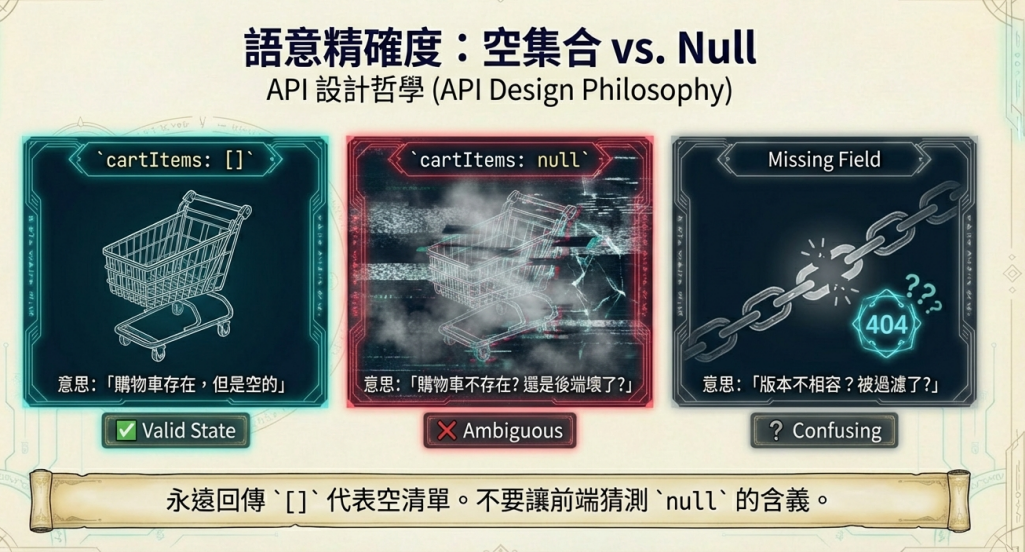
空的 list 在序列化(serialize)之後,為什麼依然會是 [](而不是 null、””、或直接不見)。因為 [] 代表「我有這個欄位,而且它是一個集合,只是目前沒有元素」——這個訊息比「沒有欄位」或「null」清楚,前後端才不會各自腦補。
購物車:使用者購物車目前沒有商品 cartItems: [] 很直觀:購物車存在,但是空的,如果是 null:是購物車不存在?還是後端出錯?但如果欄位不見:前端可能以為後端沒回、或版本不相容
tags: [] 表示「不要用 tag 篩選」,欄位不見可能被後端解讀成「用預設 tag 篩選」
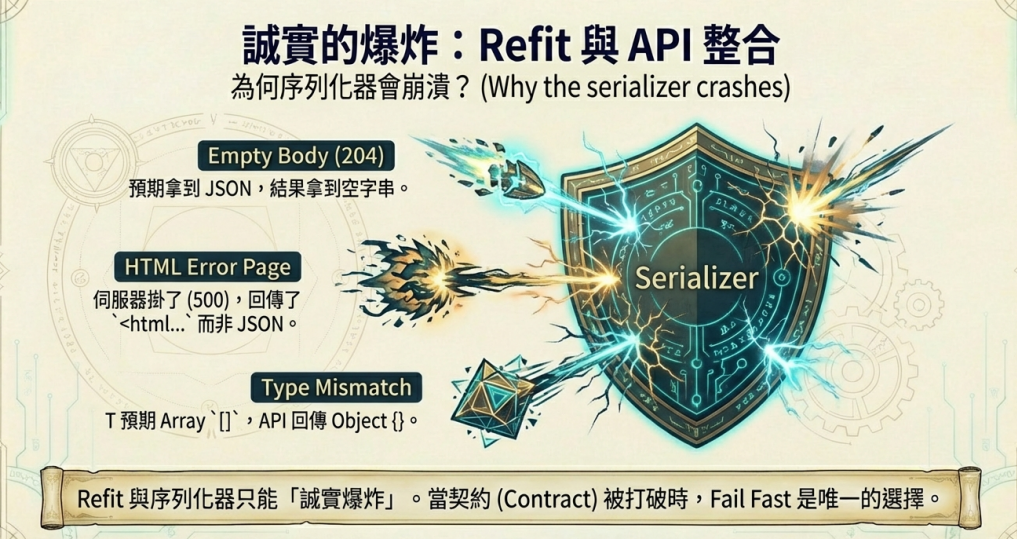
Refit 其實不是「不會反序列化」,而是你以為拿到的是 JSON,但實際回來的常常是 空 body、非 JSON、或 JSON 形狀跟你的型別對不上,序列化器只能誠實爆炸
他會看方法回傳型別決定錯誤處理策略
回 Task:反序列化或 HTTP 錯誤通常會直接丟例外
回 Task<ApiResponse>:Refit 會把 HTTP/反序列化相關例外「包進 ApiResponse.Error」,不一定會直接 throw(所以可能以為只是 Content 是 null)。
接著挑選 ContentSerializer(System.Text.Json 或 Newtonsoft)做 response.Content → T,任何一個點不符合預期就失敗:
body 根本沒有內容(空字串、204、某些 202)
Content-Type 不是 JSON(回 HTML 錯誤頁、純文字)
JSON 結構跟 T 不相容(object/array 搞反、欄位型別不對)
serializer 設定更嚴格(System.Text.Json 常比 Newtonsoft 嚴)
API 回 204 No Content,但你宣告 ApiResponse JsonException: The input does not contain any JSON tokens…
API 出錯時回 HTML(例如 nginx / IIS 的錯誤頁) Unexpected character encountered while parsing value: < 這種錯,因為你我們期待 JSON,結果拿到 …
T 期待 array,但實際回 object 會看到「應該是 JSON array」或型別不合的錯誤