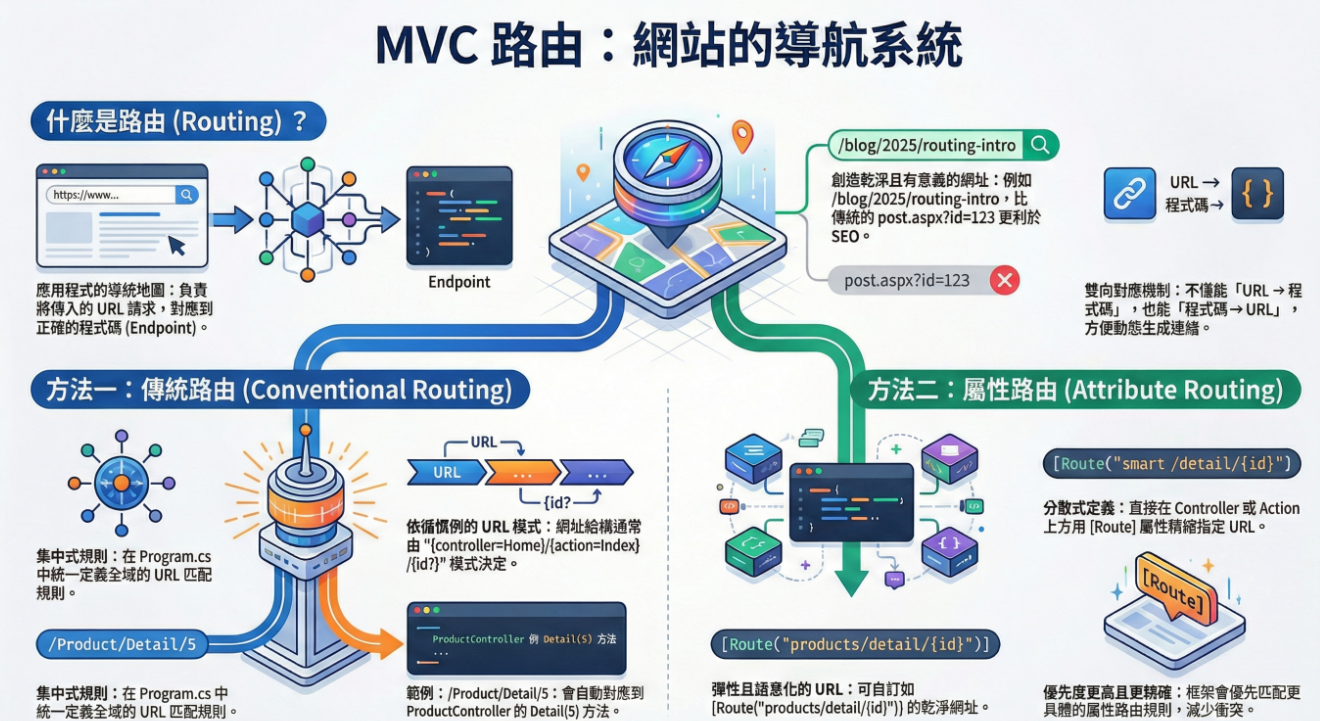
Routing 就像是 應用程式的地圖導航。每一個進來的 HTTP Request(請求)都有一個 URL,而 Routing 的工作就是判斷這個 URL 該交給哪段程式(Endpoint)來處理。Endpoint 就像門牌號碼,實際處理請求的程式(例如某個 Controller 的 Action、Razor Page、或 API 方法)。
而 Routing 系統就像導航系統,它會根據你定義的規則,把 Request 送到正確的 Endpoint。更棒的是,Routing 不只單向,它不僅能 URL → Endpoint(使用者輸入網址,找到對應程式)。
傳統的網站(像早期 ASP / PHP)網址通常長這樣
1 /products/detail.php?id=5
這直接對應伺服器上的檔案,看起來不太友善,也不利於 SEO。而在 ASP.NET Core,我們可以設計乾淨且語意化的 URL
1 2 3 4 5 6 7 8 9 [Route("blog" ) ] public class BlogController : Controller { [Route("{year:int}/{month:int}/{day:int}/{slug}" ) ] public IActionResult Post (int year, int month, int day, string slug { return Content($"文章日期:{year} /{month} /{day} , 標題:{slug} " ); } }
這樣的 URL 就會長這樣:
/blog/2025/09/23/routing-intro,而比起 /blog/post.aspx?id=123,這個 URL 更容易讓人理解 (看到網址就知道內容是什麼)。SEO 效果更好,因為網址裡包含了「routing-intro」這種關鍵字
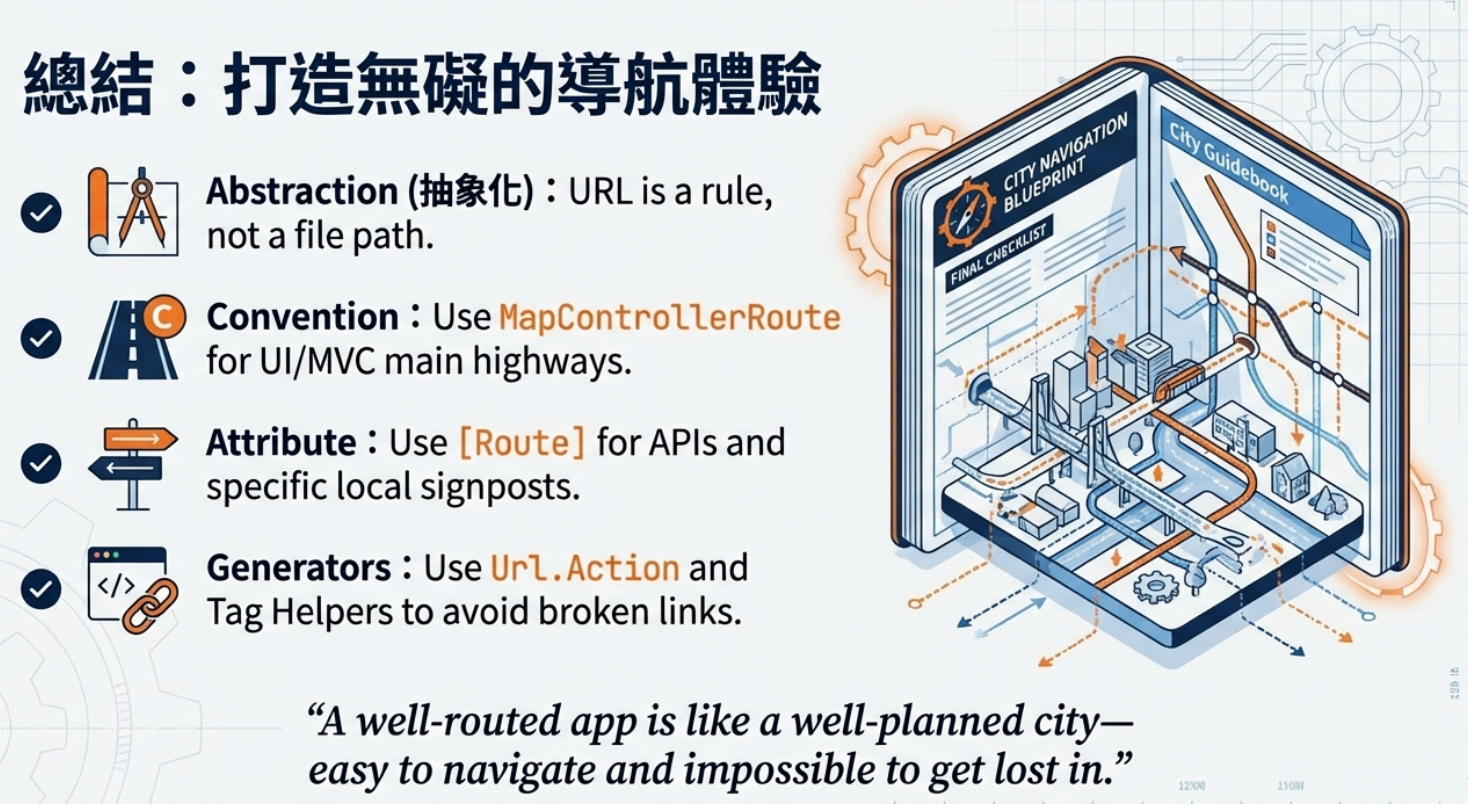
Routing 的一個重要特性是 「抽象化」,在檔案系統導向的模式裡,網址幾乎等於「伺服器檔案的實體路徑」。在 Routing 導向的模式裡,網址只是「一種規則定義」,跟檔案位置沒有任何關係。這樣的網址更容易讓人理解(看到網址就知道內容),而且搜尋引擎更喜歡(有關鍵字,不是一堆參數)
在 Program.cs(以前是 Startup.cs)裡設定一個規則,所有 Controller 和 Action 都遵循這個規則。「格式」是由全域規則決定,Controller 與 Action 名稱直接影響網址。
1
2
3
4
5
6
7
8
9
var builder = WebApplication.CreateBuilder(args);var app = builder.Build();app.MapControllerRoute( name: "default" , pattern: "{controller=Home}/{action=Index}/{id?}" ); app.Run();
這裡定義了一個路由規則
controller 預設是 Home
action 預設是 Index
id 是可選的 (?)
所以當使用者輸入
/ → 會跑到 HomeController.Index()
/Product/Detail/5 → 會跑到 ProductController.Detail(5)
或者也可以
1
2
3
4
5
app.MapControllerRoute( name: "Blog" , pattern: "blog/{year:int}/{month:int}/{day:int}/{slug}" , defaults: new { controller = "Blog" , action = "Post" } );
ASP.NET Core 在背後會自動幫每個路由指定一個「優先順序值」,所以如果兩個路由規則都符合,就會以順序較前的那個為準
1
2
3
4
5
6
7
8
app.MapControllerRoute( name: "first" , pattern: "shop/{id?}" , defaults: new { controller = "Shop" , action = "Index" }); app.MapControllerRoute( name: "second" , pattern: "{controller=Home}/{action=Index}/{id?}" );
當你打 /shop/10 → 一定會進 ShopController.Index(10)
因為 shop/{id?} 的規則排在前面,優先被比對。這就是「有順序性的路由」
在 ASP.NET Core(使用 Endpoint Routing)中
MapGet、MapPost
MapControllerRoute(conventional route)
Attribute Route([HttpGet]、[Route])
Razor Pages、SignalR、gRPC …
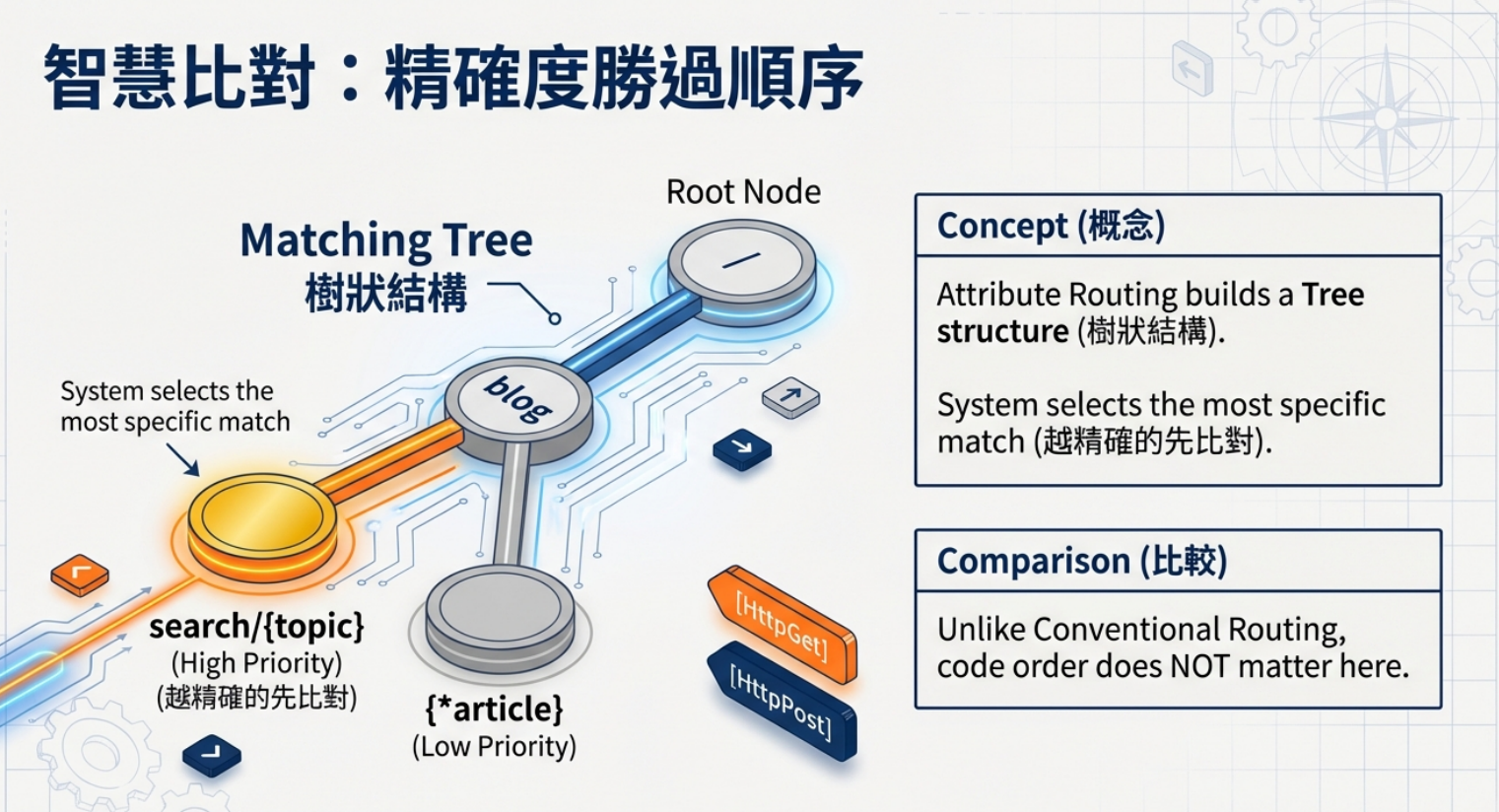
全部都不是照「宣告順序」執行f,是先「蒐集成 Endpoint 集合」,再依「匹配規則與精準度」一次性比對,當使用者發出請求(Request)時,系統會同時去比對所有可能的 Endpoint,找出符合的,但不保證順序:所以不像舊系統「誰先寫誰先中」,而是由系統根據規則(Pattern、參數)來決定最佳匹配。
1 2 3 4 app.MapGet("/hello" , () => "Hello World" ); app.MapControllerRoute( name: "default" , pattern: "{controller=Home}/{action=Index}/{id?}" );
即使 MapGet 寫在前面、MapControllerRoute 寫在後面,只要你的網址符合 /hello,系統就一定會走 MapGet,而不是因為順序靠前
直接在 Controller 或 Action 上加上 [Route] 這種屬性,明確指定網址怎麼對應。
1 2 3 4 5 6 7 8 9 10 11 12 13 14 15 [Route("products" ) ] public class ProductController : Controller { [Route("list" ) ] public IActionResult List () { return Content("商品列表" ); } [Route("detail/{id}" ) ] public IActionResult Detail (int id { return Content($"商品明細:{id} " ); } }
1
2
3
4
5
6
7
8
9
10
11
12
13
14
15
16
17
18
public class HomeController : Controller { [Route("" ) ] [Route("Home" ) ] [Route("Home/Index" ) ] [Route("Home/Index/{id?}" ) ] public IActionResult Index (int ? id { return ControllerContext.MyDisplayRouteInfo(id); } [Route("Home/About" ) ] [Route("Home/About/{id?}" ) ] public IActionResult About (int ? id { return ControllerContext.MyDisplayRouteInfo(id); } }
HomeController.Index 動作會針對任何 URL 路徑 /、/Home、/Home/Index 或 /Home/Index/3 執行。
MapControllers() 會啟用 Attribute Routing。它會去掃描所有有加上 [Route]、[HttpGet]、[HttpPost] 等 Attribute 的 Controller 和 Action,然後把這些資訊登錄成 Endpoint。沒有這行,系統根本不會知道你在 Controller 上的 [Route(“xxx”)] 要怎麼對應 URL
ASP.NET Core 在使用 Attribute Routing 時,會先把所有 [Route(…)] 收集起來,建成一棵「比對樹」。具體的路由(例如 blog/search/{topic}) → 會自動比 一般的路由(例如 blog/{*article})優先。所以大部分情況下,你不用擔心順序,因為框架本來就會「越精確的先比對」。
但有時候會遇到兩個 Controller 或 Action,都對應到一模一樣的路徑
1
2
3
4
5
6
7
8
9
10
11
public class HomeController : Controller { [Route("Home" ) ] public IActionResult Index ()"HomeController.Index" ); } public class MyDemoController : Controller { [Route("Home" ) ] public IActionResult MyIndex ()"MyDemoController.MyIndex" ); }
當你打 /Home 的時候,ASP.NET Core 會發現「有兩個符合的端點」 → 直接拋出 AmbiguousMatchException(模稜兩可錯誤)。
數字 越小,越先比對。
Order 只是用來打破平手(解決模糊),而不是讓你隨便調整路由比對規則
URL → Endpoint 假設我們有一個 StudentController
1
2
3
4
5
6
7
public class StudentController : Controller { public IActionResult Details (int id { return Content($"這是學生 {id} 的詳細資料" ); } }
使用者在瀏覽器輸入 : https://localhost:5001/Student/Details/3
Routing 系統會把它對應到:
Controller = StudentController
Action = Details
參數 = id = 3
程式就會執行 Details(3)
View 假設在某個 View 中,你想幫學生列表產生「詳細資料」的連結。你不用自己寫死網址 /Student/Details/3,可以這樣寫
1 <a asp-controller="Student" asp-action="Details" asp-route-id="3" >查看小明</a>
ASP.NET Core 的 Tag Helper 會自動產生正確的 URL
1 <a href ="/Student/Details/3" > 查看小明</a >
Url.Action 產生 URL 在 Controller 或 View 中,可以用
1 string url = Url.Action("Details" , "Student" , new { id = 5 });
會自動產生 /Student/Details/5,即使之後把 Route 規則改成 /Learner/Show/{id},上面這段程式依然能自動產生新網址 /Learner/Show/5
1
2
3
4
5
6
7
8
9
10
11
public IActionResult Index () { var url = Url.Action("Buy" , "Products" , new { id = 17 , color = "red" }); return Content(url!); } public IActionResult Index2 () { var url = Url.Action("Buy" , "Products" , new { id = 17 }, protocol: Request.Scheme); return Content(url!); }
Redirect 1 return Redirect(Url.Action("Destination" ));
效果:呼叫 /UrlGeneration/Source → 會自動 302 轉去 /UrlGeneration/Destination。
API 回傳 JSON 1 return Json(new { nextUrl = Url.Action("Destination" ) });
{ “nextUrl”: “/UrlGeneration/Destination” }
1
2
3
4
5
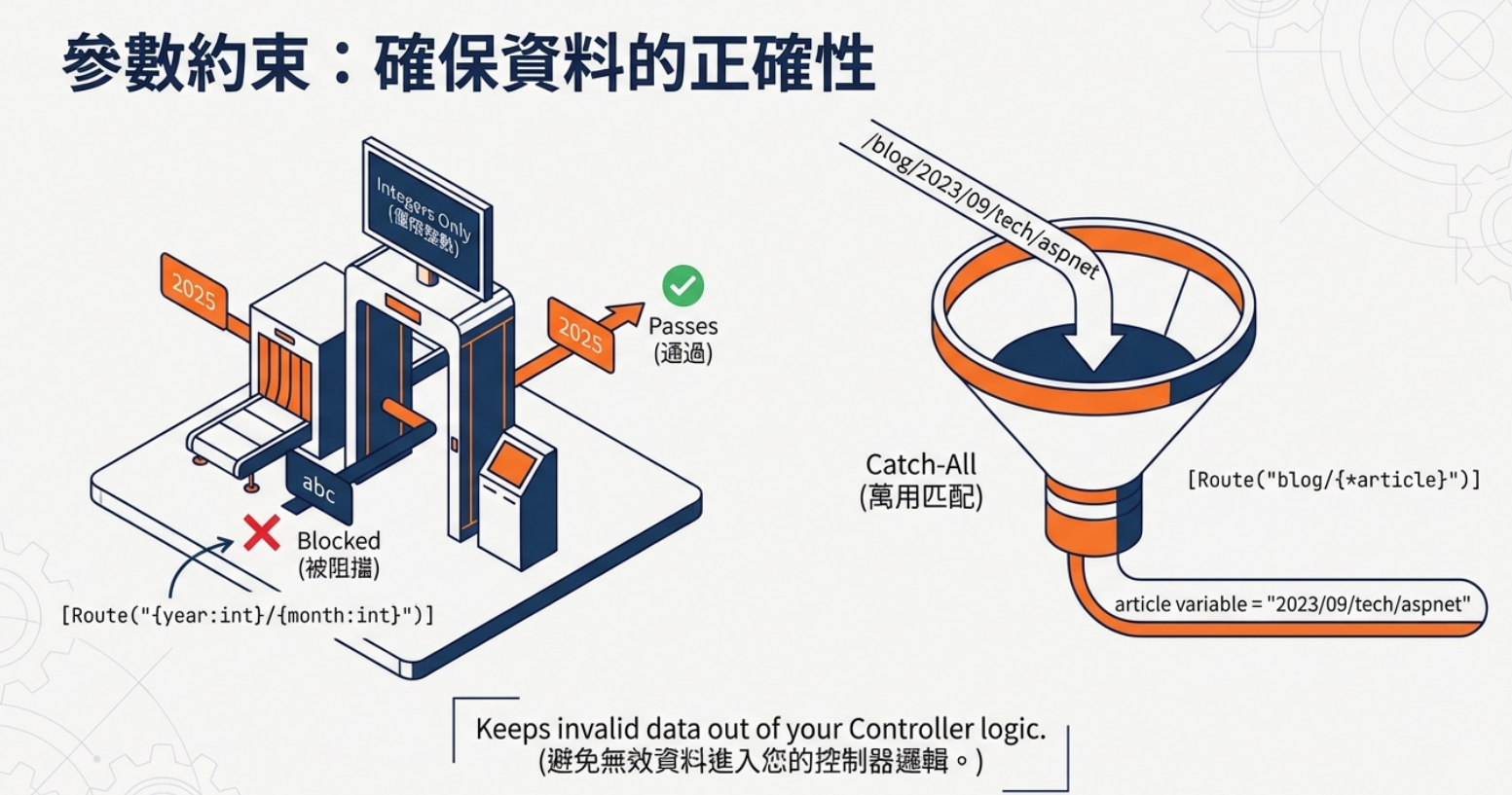
app.MapControllerRoute(name: "blog" , pattern: "blog/{*article}" , defaults: new { controller = "Blog" , action = "Article" }); app.MapControllerRoute(name: "default" , pattern: "{controller=Home}/{action=Index}/{id?}" );
只要網址長得像 blog/xxxx(後面不管幾層資料夾結構),全部都會送去 BlogController 的 Article Action 處理。
傳統 MVC (回傳 View)
1
2
3
4
5
6
7
public class HomeController : Controller { public IActionResult Index () { return View(); } }
REST API (回傳 JSON / 資料)
1 2 3 4 5 6 7 8 9 10 11 [Route("api/[controller]" ) ] [ApiController ] public class ProductsController : ControllerBase { [HttpGet("{id}" ) ] public IActionResult GetProduct (int id { var product = new { Id = id, Name = "iPhone" , Price = 30000 }; return Ok(product); } }
Controller → 可以回傳 View 或 JSON。
ControllerBase(通常搭配 [ApiController])→ 專注於 API,沒有 View 的功能。
MVC 專案比較完整 → 適合 Web UI + API 混合應用。而 Web API 專案專注純 API,減少不必要的 View 管線,效能與維護性更好
框架內部已經有特別用途的關鍵字
action
如果使用保留字做為 Routing 一部分會造成問題
1
2
3
4
5
6
7
8
public class MyDemo2Controller : Controller { [Route("/articles/{page}" ) ] public IActionResult ListArticles (int page { return Content($"Page: {page} " ); } }
照理說 /articles/5 應該會對應到 page=5。但是!因為 page 是 保留關鍵字,ASP.NET Core 在處理路由與產生連結時,會誤以為你指的是 Razor Page 的路徑,結果就可能產生「URL 不一致」或「無法正確比對」的情況
1 2 3 4 5 6 7 8 9 10 11 12 13 14 15 16 17 18 19 20 21 22 23 24 25 26 27 28 29 30 31 32 33 34 35 36 37 38 39 40 41 42 43 44 45 46 47 48 49 50 51 52 53 54 55 56 57 58 59 60 61 62 63 64 65 66 67 68 69 70 71 72 73 74 75 76 77 78 79 80 81 82 83 84 85 86 87 88 89 90 91 92 93 94 95 96 97 98 99 100 101 102 103 104 105 106 107 108 109 110 111 112 113 114 115 116 117 118 119 120 121 122 123 124 125 126 [Route("api/[controller]" ) ] [ApiController ] public class Test2Controller : ControllerBase { [HttpGet ] public IActionResult ListProducts () { return ControllerContext.MyDisplayRouteInfo(); } [HttpGet("{id}" ) ] public IActionResult GetProduct (string id { return ControllerContext.MyDisplayRouteInfo(id); } [HttpGet("int/{id:int}" ) ] public IActionResult GetIntProduct (int id { return ControllerContext.MyDisplayRouteInfo(id); } [HttpGet("int2/{id}" ) ] public IActionResult GetInt2Product (int id { return ControllerContext.MyDisplayRouteInfo(id); } } [ApiController ] public class MyProductsController : ControllerBase { [HttpGet("/products3" ) ] public IActionResult ListProducts () { return ControllerContext.MyDisplayRouteInfo(); } [HttpPost("/products3" ) ] public IActionResult CreateProduct (MyProduct myProduct ) { return ControllerContext.MyDisplayRouteInfo(myProduct.Name); } } [ApiController ] [Route("products" ) ] public class ProductsApiController : ControllerBase { [HttpGet ] public IActionResult ListProducts () { return ControllerContext.MyDisplayRouteInfo(); } [HttpGet("{id}" ) ] public IActionResult GetProduct (int id { return ControllerContext.MyDisplayRouteInfo(id); } } [Route("Home" ) ] public class HomeController : Controller { [Route("" ) ] [Route("Index" ) ] [Route("/" ) ] public IActionResult Index () { return ControllerContext.MyDisplayRouteInfo(); } [Route("About" ) ] public IActionResult About () { return ControllerContext.MyDisplayRouteInfo(); } } [Route("[controller]" ) ] public class Products13Controller : Controller { [Route("" ) ] [Route("Index" ) ] public IActionResult Index () { return ControllerContext.MyDisplayRouteInfo(); } } [Route("Store" ) ] [Route("[controller]" ) ] public class Products6Controller : Controller { [HttpPost("Buy" ) ] [HttpPost("Checkout" ) ] public IActionResult Buy () { return ControllerContext.MyDisplayRouteInfo(); } } [Route("api/[controller]" ) ] public class Products7Controller : ControllerBase { [HttpPut("Buy" ) ] [HttpPost("Checkout" ) ] public IActionResult Buy () { return ControllerContext.MyDisplayRouteInfo(); } } public class Products14Controller : Controller { [HttpPost("product14/{id:int}" ) ] public IActionResult ShowProduct (int id { return ControllerContext.MyDisplayRouteInfo(id); } }